The useful starting point
Notify Me! is a Shopify app designed to handle back-in-stock alerts, pre-orders, and low stock urgency counters across multiple communication channels. It suits merchants looking to capture lost sales from sold-out inventory by notifying shoppers via email, SMS, web push, or WhatsApp.
Finds to explore with this guide
Notify Me! Shopify App Evaluation
Notify Me! suits Shopify merchants seeking multi-channel restock alerts and flexible pre-order terms. Check specific regional messaging costs and platform integrations before committing your store workflow to this application.
See retailer details View this find
Kartra - The All-In-One Marketing Platform
Kartra is presented as a comprehensive solution for offline experts transitioning to digital, emphasizing its ability to replace 8-12 separate tools with a single connected system. This integrated approach could be highly beneficial for those seeking to avoid 'duct-taped tools' and simplify their tech stack. However, prospective users should verify the specific features included in their chosen plan to ensure it covers all their essential marketing and sales needs.
See retailer details View this find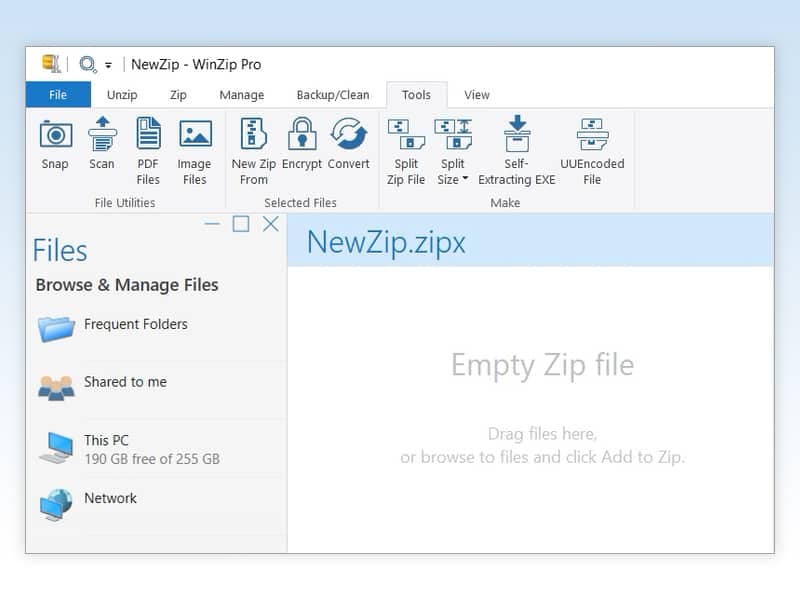
WinZip: File Compression, Protection, and Management Software
WinZip is designed for users who need a versatile tool for file compression and security, supporting a wide array of formats. Its focus on encryption and PDF watermarking suggests it's particularly suited for those handling sensitive information. Buyers should verify system compatibility and specific feature availability for their operating environment.
See retailer details View this findIntroduction to Notify Me! Buying Decisions
Choosing the right inventory communication tool for an e-commerce storefront requires balancing customer engagement channels against operational workflow capabilities. Store owners managing high-turnover inventory frequently encounter lost sales when popular items sell out unexpectedly. The Notify Me! application addresses this specific challenge by integrating directly into a Shopify environment to capture demand before it slips away. Rather than letting interested shoppers leave empty-handed, the system collects contact preferences on sold-out product pages and automates outreach the moment inventory replenishment occurs. Evaluating this application means looking closely at how multi-channel alerts, flexible pre-order terms, and integrated marketing apps fit into daily retail management without overcomplicating the storefront experience.
Core Strengths and Multi-Channel Features
The primary strength of this Shopify tool lies in its diverse notification channels, which include email, SMS, web push, and WhatsApp messaging. This multichannel capability ensures that customer outreach meets shoppers on their preferred platforms, significantly boosting the likelihood of conversion upon restock. Beyond simple back-in-stock pings, the platform supports pre-orders with full, partial, or no upfront payment options, giving merchants structural flexibility during supply chain delays. Logged-in customers and casual guests alike benefit from integrated wishlist features, while low stock urgency counters create subtle visual prompts that encourage immediate purchasing decisions. Furthermore, native integrations with prominent marketing ecosystems such as Klaviyo, Omnisend, Mailchimp, PushOwl, PageFly, and Shopify Customers allow store operators to incorporate restock triggers directly into broader marketing workflows and multi-language storefront widgets.
Consequential Trade-Offs and Operational Limits
Adopting any specialized store extension involves specific operational considerations that require careful review before deployment. Because this tool operates exclusively within the Shopify ecosystem, store owners utilizing alternative e-commerce frameworks cannot integrate the software. Additionally, relying on diverse messaging channels like SMS and WhatsApp introduces variable regional carrier costs and messaging fees that can scale quickly depending on store volume. Configuring multi-language widgets and connecting external platforms like Klaviyo or Mailchimp also demands initial setup time and ongoing data hygiene to ensure subscriber lists remain synchronized. Merchants must weigh these integration steps and messaging overhead against the projected revenue recovery from salvaged stock alerts.
Decision Worksheet and Retailer Evaluation
To determine whether this restock notification system aligns with your current store operations, work through the following practical evaluation questions. Does your Shopify catalog experience frequent sell-outs where automated re-engagement would preserve significant revenue? Are you equipped to manage regional messaging expenses associated with SMS and WhatsApp alerts alongside standard email campaigns? Do your current marketing stacks include compatible platforms like Klaviyo or Omnisend that benefit from synchronized customer data? Answering these operational questions clarifies whether implementing pre-order flexibility and low-stock urgency counters will directly improve your store conversion rates and customer satisfaction metrics.
Curator Final Selection Verdict
Notify Me! suits Shopify merchants seeking multi-channel restock alerts and flexible pre-order terms. Check specific regional messaging costs and platform integrations before committing your store workflow to this application. When inventory turnover creates regular gaps in product availability, deploying an automated alert system helps retain high-intent buyers who might otherwise abandon the brand. Provided your technical setup matches Shopify requirements and your marketing strategy utilizes supported integrations, this application delivers a streamlined mechanism for turning lost inventory moments into completed sales.
A useful next step

Sources and scope
Primary sources consulted on 24 November 2026 . Specific sourced facts are attributed in the guide; the shopping worksheets are our own. Details can change, so confirm the terms for your purchase.
Research sourceRetailer: Notify Me!View sourceResearch sourceRetailer: Kartra - The All In One Marketing PlatformView sourceResearch sourceWinZip: Easily Zip, Protect, Share and Manage Your Files | WinZipView sourceAny calculation examples are illustrative, rather than live prices. Check the retailer’s current price, availability and terms.
Suggest a factual correction →