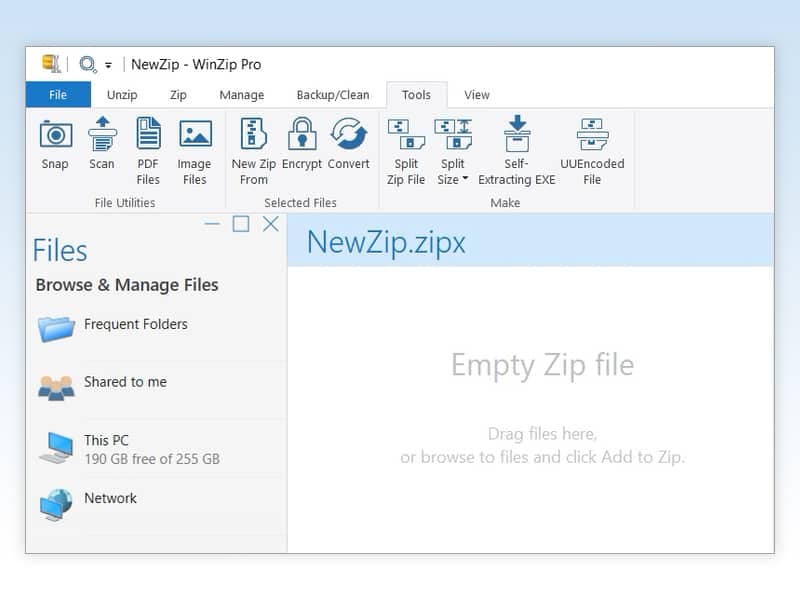
WinZip is presented as the world's #1 zip utility for file compression, protection, sharing, and management. If you frequently handle various file formats, need robust encryption, and share large files across multiple platforms, WinZip offers a comprehensive solution. This review helps you determine if its features align with your specific file handling requirements.
Our Verdict on WinZip
WinZip is a strong contender for users seeking an all-in-one solution for file compression, encryption, and sharing. Its ability to open all major compression formats and secure data with encryption and PDF watermarking makes it a valuable tool for productivity and privacy. Choose WinZip if you prioritize comprehensive file management and security features; otherwise, if your needs are limited to basic zipping and unzipping, you might find more specialized or free alternatives sufficient.
Who WinZip Is Suited To
Individuals and professionals who regularly need to compress files to save space and reduce transmission times, enhancing efficiency in their digital workflows.
Users who require robust file protection, including encryption for sensitive information and the ability to create read-only PDFs with watermarks to deter unauthorized copying.
Anyone who frequently shares large files via email, cloud services, social media, or instant messaging, and needs a streamlined way to manage files across various storage locations.
Key Strengths of WinZip
Supports all major compression formats (Zip, Zipx, RAR, 7z, TAR, GZIP, VHD, XZ, POSIX TAR and more), offering broad compatibility for opening and managing diverse archives.
Includes strong security features like file encryption during zipping and the ability to create read-only PDFs with watermarks, which helps protect sensitive data and intellectual property.
Facilitates easy file management and sharing across various platforms, allowing users to find, open, edit, move, and share files whether they are on a computer, network, or cloud service.
Considerations Before Buying WinZip
The description highlights WinZip as the 'world's #1 zip utility' without specific metrics or independent verification, so buyers should consider their own feature priorities.
While it offers extensive features, the specific pricing model and any subscription details are not provided, which is a key factor for budgeting and long-term use.
The product description does not detail system requirements or operating system compatibility, which is essential for ensuring the software will run effectively on a user's device.
Important Checks for WinZip Buyers
Verify the current pricing structure and any available subscription tiers directly on the WinZip website to understand the cost implications.
Check the system requirements and supported operating systems to ensure compatibility with your computer before purchase.
Investigate if there is a trial version available to test the features and user interface to confirm it meets your workflow preferences.
Confirm the extent of cloud service integration and compatibility with your preferred cloud storage providers.
Review the specific details of the encryption standards and PDF protection features to ensure they meet your security requirements.
Questions about this find
What file formats can WinZip open?
WinZip can open all major compression formats, including Zip, Zipx, RAR, 7z, TAR, GZIP, VHD, XZ, and POSIX TAR, among others.
How does WinZip help protect my files?
WinZip allows you to encrypt files as you zip them to secure information and data. It also enables you to create read-only PDFs and add watermarks to deter copying.
Can I share large files using WinZip?
Yes, WinZip is designed to simplify file sharing, allowing you to share large files by email, cloud services, social media, and instant messaging.
About this assessment
Our recommendation weighs the published details against likely buyer needs. It is based on source research, rather than personal testing. Confirm current pricing, availability and terms with the provider.
Read the current provider details.